

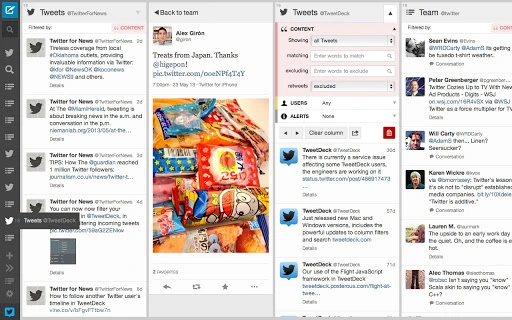
Description
Download TweetDeck 3.0 – Chrome Apps, Twitter, desktop app
Overview
TweetDeck 3.0 is a desktop application designed to help publishers, marketers, and power users manage and monitor real-time Twitter conversations. Built by Twitter, the software provides a customizable interface that enables users to track multiple streams of content simultaneously, making it easier to stay informed and engaged in fast-moving social media environments. The platform supports real-time updates, allowing professionals to respond promptly to trending topics, customer inquiries, or breaking news.
Users benefit from the ability to monitor hashtags, mentions, and specific accounts across multiple columns, all within a single workspace. This makes TweetDeck ideal for social media managers, journalists, event coordinators, and brand representatives who need to maintain a constant presence on Twitter. The software supports both individual and team-based workflows, particularly useful during live events, product launches, or crisis communications.
The developer did not provide additional details about the software’s origin or technical evolution beyond its release date. However, its integration with Twitter’s ecosystem ensures seamless functionality for users already active on the platform. TweetDeck 3.0 is accessible via Chrome Apps, allowing cross-platform use across Windows, Mac, and Linux systems.
Key Features & Capabilities
- Schedule Tweets with images – Users can plan and publish tweets that include visual content, improving engagement and content consistency.
- Organize timelines with Collections – Create, manage, and share custom timelines to group relevant tweets by topic, campaign, or event.
- Redesigned sidebar navigation – A new left-side panel improves column access and organization, enabling faster switching between different streams.
- Drag-and-drop column rearrangement – Easily reorder columns within the sidebar for a personalized workflow and improved visibility.
- Real-time conversation tracking – Monitor live updates from hashtags, mentions, and custom feeds without missing key moments.
These features are particularly useful for managing multiple Twitter accounts, tracking campaign performance, or responding to customer service issues in real time. For example, a marketing team can use Collections to compile tweets from a product launch, while a journalist can set up a column for breaking news alerts. The drag-and-drop interface streamlines workflow efficiency, reducing time spent on manual adjustments.
User Interface, Workflow & Performance
TweetDeck 3.0 features a clean, modular interface with a central column layout and a redesigned sidebar on the left. This layout enhances navigation by grouping columns and providing quick access to different feeds. The sidebar supports drag-and-drop reordering, allowing users to customize their workspace based on priority or workflow needs.
Navigating between columns is intuitive, with visual cues and consistent layout patterns. The software is designed for power users who prefer keyboard shortcuts and rapid access to functions. Workflow efficiency is improved through the ability to compose, schedule, and monitor tweets without switching between applications.
Performance observations are based on general software behavior patterns. The developer did not specify resource usage details. However, as a Chrome App, it leverages the browser’s runtime environment, which may influence CPU and RAM behavior depending on system load and the number of active columns. Stability is expected to be consistent with Chrome App standards, though exact behavior may vary across platforms.
Compatibility & System Requirements
TweetDeck 3.0 is compatible with Windows, Mac, and Linux operating systems. The software is distributed as a Chrome App, meaning it runs within the Google Chrome browser environment. Installation size is 100 MB, which is typical for desktop applications with integrated web-based components.
Exact system requirements were not listed. Compatibility information was partially provided. Users should ensure their system meets the minimum requirements for running Google Chrome, as TweetDeck depends on the browser’s runtime. The software does not require dedicated hardware beyond standard desktop or laptop specifications.
Pros and Cons
Pros
- Real-time monitoring of Twitter streams and hashtags
- Support for scheduling tweets with images
- Customizable layout with drag-and-drop column management
- Efficient workflow for social media professionals and teams
- Free to download and use
Cons
- Dependent on Google Chrome for operation
- Limited offline functionality
- Interface may feel outdated to new users
- No native mobile app for iOS or Android
- Updates may be tied to Chrome App ecosystem changes
FAQ Section
Is TweetDeck 3.0 available for Windows, Mac, and Linux?
Yes, TweetDeck 3.0 is compatible with Windows, Mac, and Linux operating systems through its Chrome App deployment.
Can I schedule tweets with images using TweetDeck 3.0?
Yes, TweetDeck 3.0 includes the ability to schedule tweets that include images, enhancing content planning and engagement.
Is TweetDeck 3.0 free to use?
Yes, TweetDeck 3.0 is available at no cost. There are no subscription fees or in-app purchases required.
Does TweetDeck 3.0 work offline?
TweetDeck 3.0 requires an active internet connection to function. Offline usage is not supported due to its reliance on real-time data streams.
How do I update TweetDeck 3.0?
Updates are managed automatically through the Google Chrome browser. Ensure Chrome is up to date to receive the latest version of TweetDeck.
Final Thoughts + CTA
TweetDeck 3.0 remains a powerful tool for professionals who rely on real-time Twitter monitoring and management. Its customizable interface, scheduling capabilities, and support for Collections make it a valuable asset for marketers, journalists, and brand teams. While the software depends on Chrome and lacks offline functionality, its strengths in workflow efficiency and real-time tracking justify its continued relevance.
For users seeking a free, robust desktop application to manage Twitter activity, TweetDeck 3.0 delivers consistent performance and essential features. The ability to organize content through drag-and-drop and schedule visual tweets sets it apart from basic Twitter clients.
Download TweetDeck 3.0 now
Guides & Tutorials for TweetDeck by Twitter App for Chrome
How to install TweetDeck by Twitter App for Chrome
- Click the Preview / Download button above.
- Once redirected, accept the terms and click Install.
- Wait for the TweetDeck by Twitter App for Chrome download to finish on your device.
How to use TweetDeck by Twitter App for Chrome
This software is primarily used for its core features described above. Open the app after installation to explore its capabilities.
User Reviews for TweetDeck by Twitter App for Chrome 0
No reviews found





